> ## Documentation Index
> Fetch the complete documentation index at: https://docs.ghostable.dev/llms.txt
> Use this file to discover all available pages before exploring further.
# Laravel Vapor
> Deploy Ghostable as part of your Laravel Vapor build & deploy.
Ghostable CLI 1.x is legacy. Prefer the current [Desktop
docs](/desktop/v1/getting-started/overview) or [CLI 2.x
docs](/cli/v2/getting-started/installation) for new work.
## Requirements
* [Ghostable CLI](https://github.com/ghostable-dev/cli) installed in your app.
* A `GHOSTABLE_CI_TOKEN` (environment-scoped). Store it in your CI secrets or store in a .env file
when running `vapor deploy` locally.
## Deployments
Add Ghostable's `vapor:deploy` command to your vapor manifest under your environment's **build**
steps. Be sure the `GHOSTABLE_CI_TOKEN` you are using for deployment corresponds with Ghostable
environment you are targeting for deployment.
```yaml vapor.yml theme={null}
id: 2
name: vapor-laravel-app
environments:
production:
build:
- 'composer install --no-dev'
- 'php vendor/bin/ghostable deploy:vapor --vapor-env=production'
staging:
build:
- 'composer install --no-dev'
- 'php vendor/bin/ghostable deploy:vapor --vapor-env=staging'
```
Variables from Vapor will be pulled down and merge with variable stored in Ghostable, then
pushed back to Vapor.
## Secrets
When your project’s deployment provider is set to **Laravel Vapor** (Project -> Settings -> General
-> Deployment Provider), Ghostable exposes an additional toggle in the variable editor: **Store as
Vapor Secret**.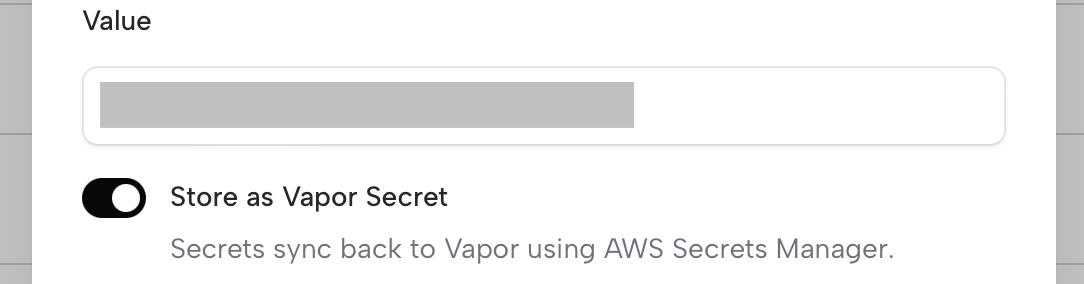 Enabling this option tells Ghostable to sync that variable to Vapor as a secret during
deployment. Vapor then propagates the secret into
[AWS Secrets Manager](https://aws.amazon.com/secrets-manager/) behind the scenes.
This lets you keep larger keys out of the .env file and can help stay under the
[2KB environment size limit enforced by AWS Lambda/Vapor](https://docs.vapor.build/projects/environments#updating-environment-variables).
As noted on in Vapor's documentation, using secrets may result in unexpected increased AWS
billing charges. Instead, we recommend you utilize environment variables and / or encrypted
environment files when possible.
## Encryption
Another way to stay under AWS’s 2KB environment variable size limit is to use environment file
encryption. Ghostable supports this directly. Simply pass the --encrypted flag to Ghostable’s
deploy:vapor command, and all non-secret environment variables will be bundled into an encrypted
file that Vapor can decrypt at runtime.
Ghostable automatically generates and injects the required `LARAVEL_ENV_ENCRYPTION_KEY` into your
Vapor environment, so there’s nothing additional to manage.
```yaml vapor.yml theme={null}
id: 2
name: vapor-laravel-app
environments:
production:
build:
- 'composer install --no-dev'
- 'php vendor/bin/ghostable deploy:vapor --vapor-env=production --encrypted'
```
A major benefit of this approach is that you no longer need to check an encrypted .env file into
source control. This avoids messy merge conflicts when collaborating with a team and keeps your
repository cleaner.
## FAQs
Yes — Vapor rollbacks continue to function normally when using Ghostable.
However, keep in mind:
* A rollback in Vapor **only affects the code and deployment artifact**, it does not roll back environment variables or secrets managed by Ghostable.
* Your Ghostable-managed variables will remain as-is unless you explicitly deploy a different set of variables from Ghostable.
If you need your application to match a previous state exactly, remember that
variables and secrets must be rolled back in Ghostable as well — Vapor does not
automatically sync those changes.
No. Ghostable only syncs and updates the secrets it manages. If you remove a variable marked as
"Store as Vapor Secret" from Ghostable, it will not automatically delete it from Vapor or AWS
Secrets Manager.
Always confirm that unused secrets are removed from Vapor/AWS manually to avoid confusion
and potential security risks.
Ghostable keeps track of the delivery mode for each variable, but Vapor may continue
to hold previous copies depending on how you’ve deployed.
If you’re migrating a variable from plaintext → encrypted → secret (or the other way
around), do a cleanup step in Vapor to remove the old copies once you’ve confirmed
your app is reading the new source correctly.
Enabling this option tells Ghostable to sync that variable to Vapor as a secret during
deployment. Vapor then propagates the secret into
[AWS Secrets Manager](https://aws.amazon.com/secrets-manager/) behind the scenes.
This lets you keep larger keys out of the .env file and can help stay under the
[2KB environment size limit enforced by AWS Lambda/Vapor](https://docs.vapor.build/projects/environments#updating-environment-variables).
As noted on in Vapor's documentation, using secrets may result in unexpected increased AWS
billing charges. Instead, we recommend you utilize environment variables and / or encrypted
environment files when possible.
## Encryption
Another way to stay under AWS’s 2KB environment variable size limit is to use environment file
encryption. Ghostable supports this directly. Simply pass the --encrypted flag to Ghostable’s
deploy:vapor command, and all non-secret environment variables will be bundled into an encrypted
file that Vapor can decrypt at runtime.
Ghostable automatically generates and injects the required `LARAVEL_ENV_ENCRYPTION_KEY` into your
Vapor environment, so there’s nothing additional to manage.
```yaml vapor.yml theme={null}
id: 2
name: vapor-laravel-app
environments:
production:
build:
- 'composer install --no-dev'
- 'php vendor/bin/ghostable deploy:vapor --vapor-env=production --encrypted'
```
A major benefit of this approach is that you no longer need to check an encrypted .env file into
source control. This avoids messy merge conflicts when collaborating with a team and keeps your
repository cleaner.
## FAQs
Yes — Vapor rollbacks continue to function normally when using Ghostable.
However, keep in mind:
* A rollback in Vapor **only affects the code and deployment artifact**, it does not roll back environment variables or secrets managed by Ghostable.
* Your Ghostable-managed variables will remain as-is unless you explicitly deploy a different set of variables from Ghostable.
If you need your application to match a previous state exactly, remember that
variables and secrets must be rolled back in Ghostable as well — Vapor does not
automatically sync those changes.
No. Ghostable only syncs and updates the secrets it manages. If you remove a variable marked as
"Store as Vapor Secret" from Ghostable, it will not automatically delete it from Vapor or AWS
Secrets Manager.
Always confirm that unused secrets are removed from Vapor/AWS manually to avoid confusion
and potential security risks.
Ghostable keeps track of the delivery mode for each variable, but Vapor may continue
to hold previous copies depending on how you’ve deployed.
If you’re migrating a variable from plaintext → encrypted → secret (or the other way
around), do a cleanup step in Vapor to remove the old copies once you’ve confirmed
your app is reading the new source correctly.