> ## Documentation Index
> Fetch the complete documentation index at: https://docs.ghostable.dev/llms.txt
> Use this file to discover all available pages before exploring further.
# Deployments
> Deploy Ghostable-managed environments to any CI runner—Laravel Cloud/Forge/Vapor, Vercel, Netlify, Kubernetes, and beyond—using deployment tokens.
Issue the deployment secrets first, then come back here for the provider-specific automation
flow.
## Obtain a token
Automated deployments should use **deployment tokens**, not interactive device identities. A
deployment token provides two secrets:
* `GHOSTABLE_CI_TOKEN` — authenticates the runner against Ghostable’s API.
* `GHOSTABLE_DEPLOY_SEED` — the private key that lets the runner decrypt environment secrets.
### Mint via CLI
Follow the [Deploy Tokens guide](/cli/v2/workflows/deploy-tokens) to create a token from a trusted
workstation. The wizard prompts for the environment and name, mints the keypair, re-shares the
environment key, and prints both secrets.
**Store both secrets in your CI** (for example, `GHOSTABLE_CI_TOKEN` and `GHOSTABLE_DEPLOY_SEED`).
They are only shown once.
Deployment tokens are intentionally CLI-only in v2 to ensure you always have the matching private
key stored locally before uploading it to CI. If you lose either secret, revoke the token with
`ghostable deploy token revoke` and mint a new one.
***
### Jump to a workflow
* [Generic CLI Deploy](#generic-cli-deploy)
* [OpenClaw](#openclaw)
* [Laravel Cloud](#laravel-cloud)
* [Laravel Forge](#laravel-forge)
* [Laravel Vapor](#laravel-vapor)
* [Deployment tokens reference](/cli/v2/workflows/deploy-tokens)
Need a refresher on minting deployment tokens? Review the [Deploy Tokens
guide](/cli/v2/workflows/deploy-tokens) any time—every workflow below relies on the same
secrets.
## Generic CLI Deploy
Use this provider-agnostic flow whenever you just need a plaintext `.env` file written to the
current working directory (or a custom path)—perfect for [Vercel](https://vercel.com),
[Render](https://render.com), [Netlify](https://www.netlify.com), or any workflow that expects env
files on disk:
```bash theme={null}
ghostable env deploy --token $GHOSTABLE_CI_TOKEN --file .env.production
```
What it does:
1. Authenticates with your deployment token (`GHOSTABLE_CI_TOKEN` + `GHOSTABLE_DEPLOY_SEED`).
2. Downloads the encrypted environment bundle for the token’s scope.
3. Decrypts everything locally and writes a ready-to-use `.env` file (preserving existing comments).
Set `GHOSTABLE_DEPLOY_SEED` from the deployment token’s private key. Without it, the runner
cannot decrypt secrets.
Don’t have a token yet? Follow the [Deploy Tokens guide](/cli/v2/workflows/deploy-tokens) before
wiring up your CI job.
Override the CI token (defaults to the `GHOSTABLE_CI_TOKEN` env var).
Output destination for the decrypted `.env`. Defaults to `.env` in the working directory.
Limit the deploy to specific keys when you only need a subset of variables.
## Deploy Bundle Cache (Resilience Mode)
Ghostable can cache the encrypted deploy bundle locally on your runner. This gives you a controlled
fallback path when the Ghostable API is temporarily unavailable.
### Warm the cache
```bash theme={null}
ghostable deploy cache warm --token $GHOSTABLE_CI_TOKEN
```
Use `--only` with `deploy cache warm` if your deploy scope is a key subset:
```bash theme={null}
ghostable deploy cache warm --token $GHOSTABLE_CI_TOKEN --only APP_KEY --only DB_PASSWORD
```
### Use stale-cache fallback during outages
Enable fallback explicitly with `--allow-stale-cache` on deploy commands:
```bash theme={null}
ghostable env deploy --token $GHOSTABLE_CI_TOKEN --allow-stale-cache
ghostable deploy cloud --allow-stale-cache
ghostable deploy forge --allow-stale-cache
ghostable deploy vapor --allow-stale-cache --vapor-env=production
```
Fallback rules in Phase 2:
* Stale cache is used only when live fetch fails due to availability/network/server issues.
* Cache entry must pass integrity validation and be no older than 24 hours.
* Cache is bound to API base URL, token fingerprint, and `--only` scope.
* Ghostable never falls back for auth/authz failures (`401`/`403`) or invalid request errors.
* Cache stores encrypted bundle data only (no plaintext secret cache).
When fallback is used, CLI output marks the source as `stale-cache` and includes cache age.
`--allow-stale-cache` is an emergency path for temporary outages, not a replacement for normal
live deploy fetches.
***
## OpenClaw
To use Ghostable during deployments with [OpenClaw](https://openclaw.ai):
1. Ensure [Ghostable CLI](https://github.com/ghostable-dev/cli) is installed on the host or image
that will start OpenClaw.
2. Mint a deployment token for the Ghostable environment you want OpenClaw to read, then store
`GHOSTABLE_CI_TOKEN` and `GHOSTABLE_DEPLOY_SEED` in your CI or host secret manager.
3. Before starting OpenClaw, write the env file Ghostable should hydrate:
```bash theme={null}
ghostable env deploy --token $GHOSTABLE_CI_TOKEN --file .env.openclaw
```
4. Start OpenClaw with that generated env file, or target `~/.openclaw/.env` directly on host
installs:
```bash theme={null}
docker compose --env-file .env.openclaw up -d
```
OpenClaw already supports configuration via process env, project-local `.env`, and
`~/.openclaw/.env`, so Ghostable fits cleanly into Docker Compose, CI-generated files, or
host-level runtime config.
For workstation testing, prefer `ghostable env pull --env development --file .env.openclaw` and
reserve deployment tokens for CI or production runners.
***
## Laravel Cloud
To use Ghostable during deployments with [Laravel Cloud](https://cloud.laravel.com):
1. Ensure [Ghostable CLI](https://github.com/ghostable-dev/cli) is installed in your app.
2. Open the application you want to configure.
3. Go to **Environments** and select the one you want to deploy.
4. Go to **Settings → General → Custom environment variables → Reveal secrets**.
5. Add your Ghostable secrets:
```bash theme={null}
# From Ghostable → Environment → Settings → Access
GHOSTABLE_CI_TOKEN="YOUR_DEPLOYMENT_TOKEN"
# Private key output during `ghostable deploy token create`
GHOSTABLE_DEPLOY_SEED="b64:AAAA..."
```
The deployment seed originates from a trusted workstation and should be stored only in your
team’s secure vault (such as 1Password, Bitwarden, or LastPass).
Want the shorter product walkthrough? See the [Laravel Cloud integration
page](https://ghostable.dev/integrations/cloud).
5. Go to Settings → Deployments → Build commands
6. Add the Ghostable build command before your config:cache step.
Example:
```bash theme={null}
composer install --no-dev
npm ci --audit false
npm run build
# Deploy environment variables from Ghostable
npx ghostable deploy cloud
# Rebuild Laravel config cache so new vars are applied
LARAVEL_CLOUD=1 php artisan config:cache
```
***
## Laravel Forge
To use Ghostable during deployments with [Laravel Forge](https://forge.laravel.com):
1. Ensure [Ghostable CLI](https://github.com/ghostable-dev/cli) is installed in your app.
2. Open your site in **Forge**.
3. Go to **Environment → Reveal Environment Variables**.
4. Add your Ghostable secrets:
```bash theme={null}
# From Ghostable → Environment → Settings → Access
GHOSTABLE_CI_TOKEN="YOUR_DEPLOYMENT_TOKEN"
# Private key output during `ghostable deploy token create`
GHOSTABLE_DEPLOY_SEED="b64:AAAA..."
```
The deployment seed originates from a trusted workstation and should be stored only in your
team’s secure vault (such as 1Password, Bitwarden, or LastPass). Forge simply injects it at
deploy time so the runner can derive per-environment keys securely.
5. Go to **Site → Deployment Script** and add the Ghostable deployment command before your
`config:cache` step.
```bash Example theme={null}
cd /home/forge/default
git pull origin $FORGE_SITE_BRANCH
$FORGE_COMPOSER install --no-dev --no-interaction --prefer-dist --optimize-autoloader
npm ci --audit false
npm run build
if [ -f artisan ]; then
$FORGE_PHP artisan optimize
$FORGE_PHP artisan migrate --force
# Deploy environment variables from Ghostable
npx ghostable deploy forge
# Rebuild Laravel config cache
$FORGE_PHP artisan config:cache
fi
```
Ghostable merges its managed variables with those already in Forge. Existing keys are updated in
place, new keys are added, and anything unmanaged is left untouched.
### Encryption
Environment file encryption works in Forge just like in Vapor.
Pass the `--encrypted` flag to `deploy forge`, and Ghostable will bundle variables into an encrypted
**.env.encrypted** file.
The CLI automatically generates and stores the required `LARAVEL_ENV_ENCRYPTION_KEY` so decryption
works at runtime.
```bash Deployment Script theme={null}
npx ghostable deploy forge --encrypted
```
**Benefits:**
* Eliminates the need to commit encrypted **.env** files into source control.
* Reduces merge conflicts when working in teams.
### FAQS
Yes — Forge rollbacks behave as normal. But note: - Rollbacks affect the **code** and
deployment artifact only. - Ghostable-managed variables are not rolled back automatically.
If you need to roll back variables, perform the rollback in Ghostable as well.
No — Ghostable only pushes the variables it manages. If you remove a variable from
Ghostable, it is not automatically removed from Forge.
Manually clean up unused variables in Forge to avoid confusion or security risk.
Ghostable tracks the delivery mode for each variable, but Forge may still have old copies.
When migrating a variable between plain and encrypted, remove the old copy from Forge
once you’ve confirmed your app is reading the new value.
***
## Laravel Vapor
To use Ghostable during deployments with [Laravel Vapor](https://vapor.laravel.com):
1. Ensure [Ghostable CLI](https://github.com/ghostable-dev/cli) is installed in your app.
2. Store your Ghostable secrets in your CI secrets storage or store in a .env file when running
`vapor deploy` locally.
```bash theme={null}
# From Ghostable → Environment → Settings → Access
GHOSTABLE_CI_TOKEN: "YOUR_DEPLOYMENT_TOKEN"
# Private key output during `ghostable deploy token create`
GHOSTABLE_DEPLOY_SEED: "b64:AAAA..."
```
The deployment seed originates from a trusted workstation and should be stored only in your
team’s secure vault (such as 1Password, Bitwarden, or LastPass). Vapor injects it securely at
build time so Ghostable can derive per-environment keys without exposing any secrets.
3. Open your project’s **vapor.yml** file.
4. Add the Ghostable deploy command to your Vapor build steps, before any caching or optimization
commands.
```yaml vapor.yml theme={null}
id: 2
name: vapor-laravel-app
environments:
production:
build:
- 'composer install --no-dev'
- 'npx ghostable deploy vapor --vapor-env=production'
staging:
build:
- 'composer install --no-dev'
- 'npx ghostable deploy vapor --vapor-env=staging'
```
Variables from Vapor will be pulled down and merge with variable stored in Ghostable, then
pushed back to Vapor.
### Secrets
When your project’s deployment provider is set to **Laravel Vapor** (Project -> Settings -> General
-> Deployment Provider), Ghostable exposes an additional toggle in the variable editor: **Store as
Vapor Secret**.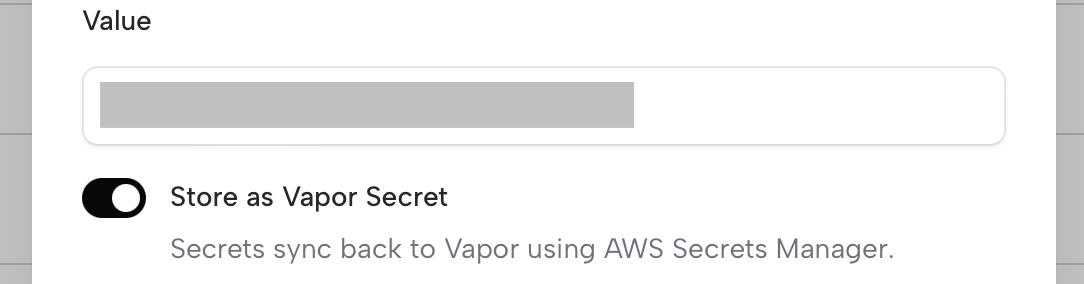 Enabling this option tells Ghostable to sync that variable to Vapor as a secret during
deployment. Vapor then propagates the secret into
[AWS Secrets Manager](https://aws.amazon.com/secrets-manager/) behind the scenes.
This lets you keep larger keys out of the .env file and can help stay under the
[2KB environment size limit enforced by AWS Lambda/Vapor](https://docs.vapor.build/projects/environments#updating-environment-variables).
As noted on in Vapor's documentation, using secrets may result in unexpected increased AWS
billing charges. Instead, we recommend you utilize environment variables and / or encrypted
environment files when possible.
### Encryption
Another way to stay under AWS’s 2KB environment variable size limit is to use environment file
encryption. Ghostable supports this directly. Simply pass the --encrypted flag to Ghostable’s
`deploy vapor` command, and all non-secret environment variables will be bundled into an encrypted
file that Vapor can decrypt at runtime.
Ghostable automatically generates and injects the required `LARAVEL_ENV_ENCRYPTION_KEY` into your
Vapor environment, so there’s nothing additional to manage.
```yaml vapor.yml theme={null}
id: 2
name: vapor-laravel-app
environments:
production:
build:
- 'composer install --no-dev'
- 'npx ghostable deploy vapor --vapor-env=production --encrypted'
```
A major benefit of this approach is that you no longer need to check an encrypted .env file into
source control. This avoids messy merge conflicts when collaborating with a team and keeps your
repository cleaner.
### FAQs
Yes — Vapor rollbacks continue to function normally when using Ghostable.
However, keep in mind:
* A rollback in Vapor **only affects the code and deployment artifact**, it does not roll back environment variables or secrets managed by Ghostable.
* Your Ghostable-managed variables will remain as-is unless you explicitly deploy a different set of variables from Ghostable.
If you need your application to match a previous state exactly, remember that
variables and secrets must be rolled back in Ghostable as well — Vapor does not
automatically sync those changes.
No. Ghostable only syncs and updates the secrets it manages. If you remove a variable marked as
"Store as Vapor Secret" from Ghostable, it will not automatically delete it from Vapor or AWS
Secrets Manager.
Always confirm that unused secrets are removed from Vapor/AWS manually to avoid confusion
and potential security risks.
Ghostable keeps track of the delivery mode for each variable, but Vapor may continue
to hold previous copies depending on how you’ve deployed.
If you’re migrating a variable from plaintext → encrypted → secret (or the other way
around), do a cleanup step in Vapor to remove the old copies once you’ve confirmed
your app is reading the new source correctly.
Enabling this option tells Ghostable to sync that variable to Vapor as a secret during
deployment. Vapor then propagates the secret into
[AWS Secrets Manager](https://aws.amazon.com/secrets-manager/) behind the scenes.
This lets you keep larger keys out of the .env file and can help stay under the
[2KB environment size limit enforced by AWS Lambda/Vapor](https://docs.vapor.build/projects/environments#updating-environment-variables).
As noted on in Vapor's documentation, using secrets may result in unexpected increased AWS
billing charges. Instead, we recommend you utilize environment variables and / or encrypted
environment files when possible.
### Encryption
Another way to stay under AWS’s 2KB environment variable size limit is to use environment file
encryption. Ghostable supports this directly. Simply pass the --encrypted flag to Ghostable’s
`deploy vapor` command, and all non-secret environment variables will be bundled into an encrypted
file that Vapor can decrypt at runtime.
Ghostable automatically generates and injects the required `LARAVEL_ENV_ENCRYPTION_KEY` into your
Vapor environment, so there’s nothing additional to manage.
```yaml vapor.yml theme={null}
id: 2
name: vapor-laravel-app
environments:
production:
build:
- 'composer install --no-dev'
- 'npx ghostable deploy vapor --vapor-env=production --encrypted'
```
A major benefit of this approach is that you no longer need to check an encrypted .env file into
source control. This avoids messy merge conflicts when collaborating with a team and keeps your
repository cleaner.
### FAQs
Yes — Vapor rollbacks continue to function normally when using Ghostable.
However, keep in mind:
* A rollback in Vapor **only affects the code and deployment artifact**, it does not roll back environment variables or secrets managed by Ghostable.
* Your Ghostable-managed variables will remain as-is unless you explicitly deploy a different set of variables from Ghostable.
If you need your application to match a previous state exactly, remember that
variables and secrets must be rolled back in Ghostable as well — Vapor does not
automatically sync those changes.
No. Ghostable only syncs and updates the secrets it manages. If you remove a variable marked as
"Store as Vapor Secret" from Ghostable, it will not automatically delete it from Vapor or AWS
Secrets Manager.
Always confirm that unused secrets are removed from Vapor/AWS manually to avoid confusion
and potential security risks.
Ghostable keeps track of the delivery mode for each variable, but Vapor may continue
to hold previous copies depending on how you’ve deployed.
If you’re migrating a variable from plaintext → encrypted → secret (or the other way
around), do a cleanup step in Vapor to remove the old copies once you’ve confirmed
your app is reading the new source correctly.