Use this matrix to assess where Ghostable controls align with common security concerns and what evidence is available to reviewers.

Controls Matrix

ConcernGhostable ControlEvidence
Client supply-chain tamperingRelease checksums + signed build provenance + SBOM publicationRelease assets: SHA256SUMS, SBOM, and provenance evidence (CLI public; server and desktop internal/private, with attestation support dependent on repository visibility and plan)
In-transit confidentialityTLS transport and signed client payloads for secret updatesAPI request signatures (client_sig)
Push race conditions / lost updatesOptimistic concurrency via if_version, strict conflict mode, explicit force overrideAPI 409 conflict payloads (conflicts[]), CLI --conflict-mode and --force-overwrite
Unauthorized push attemptsDevice ownership validation and revocation checksPush API rejects unknown/revoked devices
Least-privilege accessRole + permission model with scoped project/environment operationsOrganization roles/permissions and permission matrix endpoint
External monitoring visibilityAudit webhook destinations with signed event delivery, retries, and dead-letter stateAudit webhook API + delivery status fields
AuditabilityStructured activity logging across org/project/environment actionsOrganization/project/environment history endpoints and activity export
SaaS dependency resilienceEncrypted backup + restore workflowsbackup create / backup restore command flow

API Endpoints for Evidence Collection

  • GET /api/v2/organizations/{organization}/permission-matrix
  • GET /api/v2/organizations/{organization}/audit-webhooks
  • GET /api/v2/organizations/{organization}/audit-webhooks/metrics?window=24h|7d|30d
  • POST /api/v2/organizations/{organization}/audit-webhooks
  • POST /api/v2/organizations/{organization}/audit-webhooks/{auditWebhook}/rotate-secret
  • POST /api/v2/organizations/{organization}/audit-webhooks/{auditWebhook}/disable
  • POST /api/v2/organizations/{organization}/audit-webhooks/{auditWebhook}/test
  • GET /api/v2/organizations/{organization}/audit-webhooks/metrics

Dashboard UI: Audit Webhooks

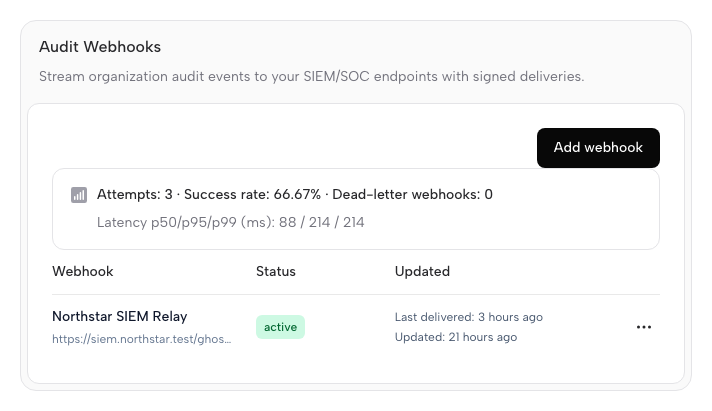
Audit webhooks can be managed in the Ghostable dashboard:
  1. Open your organization in Ghostable.
  2. Go to Settings.
  3. Open the Notifications tab.
  4. Use the Audit Webhooks section.
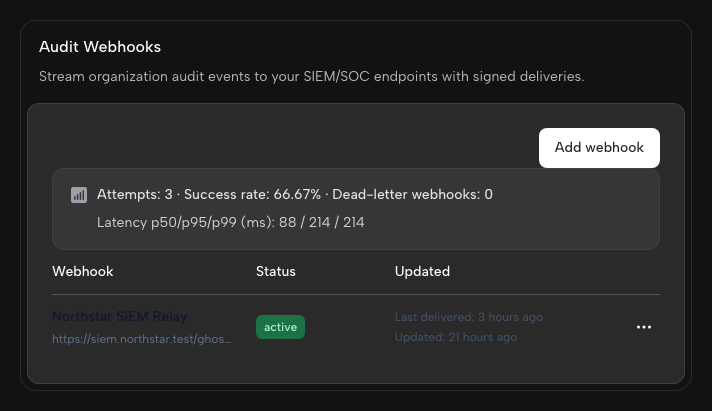
Ghostable dashboard showing audit webhook destinations, status, and delivery health.

What You Can Do in the UI

  • Create a webhook with:
    • a friendly name (for example, Security SIEM)
    • an endpoint URL (https://...)
  • Copy the signing secret shown once at creation/rotation time.
  • Review delivery health fields:
    • status (active, disabled, dead_letter)
    • consecutive failures
    • last delivery/error details
  • Open the delivery metrics popover for a webhook to see attempt rates and latency buckets.
  • Use the action dropdown per webhook row:
    • Send test event
    • Rotate signing secret
    • Disable webhook
  • Review delivery metrics:
    • selected time window (24h, 7d, 30d)
    • attempts, successes, failures, and success rate
    • p50/p95/p99 latency + latency bucket distribution
Only organization admins can create or manage audit webhooks in the dashboard UI.

API Contract Examples

Version conflict payload (409)

Ghostable normalizes optimistic lock conflicts to a deterministic API shape:
{
    "error": {
        "code": "version_conflict",
        "message": "Version conflict detected for one or more keys.",
        "status": 409
    },
    "conflicts": [
        {
            "key": "APP_KEY",
            "server_version": 12,
            "client_if_version": 11
        }
    ]
}

Audit webhook metrics payload (200)

{
    "window": "24h",
    "summary": {
        "attempted": 320,
        "succeeded": 315,
        "failed": 5,
        "success_rate": 98.44,
        "dead_lettered_webhooks": 0,
        "latency": {
            "p50_ms": 81,
            "p95_ms": 403,
            "p99_ms": 844
        }
    },
    "webhooks": [
        {
            "id": "01H...",
            "name": "Security SIEM",
            "status": "active",
            "attempted": 160,
            "succeeded": 158,
            "failed": 2,
            "success_rate": 98.75,
            "latency": {
                "p50_ms": 79,
                "p95_ms": 390,
                "p99_ms": 801
            },
            "latency_buckets": {
                "0_100_ms": 112,
                "101_300_ms": 35,
                "301_1000_ms": 13,
                "1001_3000_ms": 0,
                "3001_plus_ms": 0
            },
            "last_error": null
        }
    ]
}
See SIEM template mappings for ingestion examples.

Webhook Signature Verification

Ghostable audit webhooks include the following headers:
  • X-Ghostable-Timestamp: unix timestamp in seconds.
  • X-Ghostable-Signature: HMAC in the format sha256=<hex_digest>.
To verify a delivery:
  1. Read the raw request body exactly as received.
  2. Build the signed message as <timestamp>.<raw_body>.
  3. Compute HMAC-SHA256(message, signing_secret).
  4. Compare the result to X-Ghostable-Signature using constant-time comparison.
  5. Reject the request if abs(now - timestamp) > 300 seconds.
For replay protection, cache each webhook event id for at least 5-10 minutes and reject duplicates.

Notes

  • push_force_overwrite activity events are emitted when optimistic locking is intentionally bypassed.
  • Teams with strict change control should require --conflict-mode strict in CI workflows.